Everything Wrong with MSIX: No System Context
Microsoft has started a new Inside MSIX blog series, and I thought I'd start my own counter series called "Everything Wrong with MSIX". This is a topic I've considered writing about for years, but never mustered the courage to begin until now: I have a lot to unpack about MSIX.
PowerShell recently announced the deprecation of its MSI installer in favor of MSIX, despite current known limitations acknowledged by the team:
At this time, MSIX doesn't support all use case scenarios that MSI enabled, such as remoting and execution by system-level services (like Task Scheduler). We recognize this gap and are actively working to address it.
That caveat matters because PowerShell is not just an app you launch from Windows Terminal. It is infrastructure used by scheduled tasks, deployment systems, services, remote administration workflows, and endpoint management tools. A large amount of that automation runs as NT AUTHORITY\SYSTEM.
MSIX Is Not a Better MSI
MSIX is not a better MSI. It is a different deployment model with different assumptions.
MSIX stages package payloads on the machine, then registers them for users. That works for many desktop applications, but it is not the same thing as installing a command-line tool under Program Files and making it available to every account that has permission to run it.
SYSTEM is not your interactive user. It is a separate security principal with its own profile, its own %LOCALAPPDATA%, and its own view of user-scoped package registrations and app execution aliases. That is why PowerShell can be staged on the machine, registered for your account, visible in Get-AppxPackage -AllUsers, and still disappear when the current user is NT AUTHORITY\SYSTEM.
Testing in a System Context
First, let's install PowerShell 7 from the MSIX package using WinGet:
winget install --id Microsoft.PowerShell --installer-type msixSo far, so good. pwsh.exe is available for the current user:
PS> Get-AppxPackage Microsoft.PowerShell | Select-Object -Property Name,Version,Publisher,PackageFullName,InstallLocation

Name            : Microsoft.PowerShell
Version         : 7.6.1.0
Publisher       : CN=Microsoft Corporation, O=Microsoft Corporation, L=Redmond, S=Washington, C=US
PackageFullName : Microsoft.PowerShell_7.6.1.0_x64__8wekyb3d8bbwe
InstallLocation : C:\Program Files\WindowsApps\Microsoft.PowerShell_7.6.1.0_x64__8wekyb3d8bbwe
The pwsh command is also available through an app execution alias under %LOCALAPPDATA%\Microsoft\WindowsApps:
PS> (Get-Command pwsh).Source
C:\Users\Administrator.IT-HELP\AppData\Local\Microsoft\WindowsApps\pwsh.exe
So, what's the problem? PowerShell is available to regular users who log on interactively to Windows, but it is not registered in the SYSTEM context. That matters as soon as PowerShell needs to run from a service, deployment agent, endpoint management tool, or scheduled task. Let's simulate that with PsExec:
psexec -nobanner -s -i pwsh.exe -NoLogo -NoProfile

PsExec could not start pwsh.exe on IT-HELP-TEST:
The system cannot find the file specified.
Oops. Why can't PsExec find pwsh.exe? Launch powershell.exe instead, which ships with Windows and is not MSIX-packaged:
psexec -nobanner -s -i powershell.exe -NoLogo -NoProfile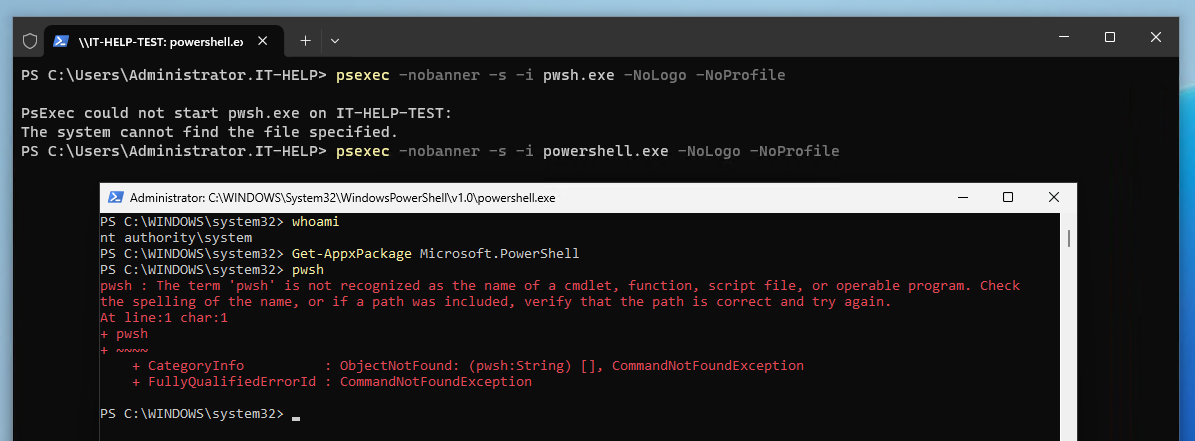
If launching powershell.exe through PsExec worked, you should now see the "classic" console host, not Windows Terminal. I'm sure there are many reasons why Windows Terminal cannot run in a system context, but MSIX is at least one of them. Confirm the new shell runs as nt authority\system, then try using PowerShell 7:
PS C:\WINDOWS\system32> whoami
nt authority\system
PS C:\WINDOWS\system32> Get-AppxPackage Microsoft.PowerShell
PS C:\WINDOWS\system32> pwsh
pwsh : The term 'pwsh' is not recognized as the name of a cmdlet, function, script file, or operable program. Check
the spelling of the name, or if a path was included, verify that the path is correct and try again.
At line:1 char:1
+ pwsh
+ ~~~~
    + CategoryInfo          : ObjectNotFound: (pwsh:String) [], CommandNotFoundException
    + FullyQualifiedErrorId : CommandNotFoundException
If you try launching winget.exe, it fails in the same way. The same pattern applies: the payload may be staged on the machine, but the per-user registration and app execution alias are not present in the SYSTEM context.
That is the part MSIX gets wrong for infrastructure tooling. It is not just a desktop application launcher problem. PowerShell scripts run from scheduled tasks in the SYSTEM context. Deployment and endpoint management agents run as services. Network services perform authentication and create sessions under identities that are not normal interactive desktop users. The WinRM service uses a PowerShell plugin DLL for the PowerShell Remoting server environment. Treating PowerShell as a per-user registered application breaks those assumptions by design.
WinGet Has the Same Problem
WinGet is another visible example of the same MSIX limitation.
In microsoft/winget-cli#5991, the maintainers were asked whether the WinGet CLI is supported from the SYSTEM user running in session 0. The answer was direct:
The CLI is not supported from SYSTEM at all, as one cannot register the MSIX package for the SYSTEM user.
Microsoft's own WinGet troubleshooting documentation now says the same thing: WinGet is delivered through App Installer as a packaged application, depends on an app execution alias being resolved on PATH, and is not supported in the system context.
Closing Thoughts
PowerShell is much more than an interactive shell in a user context, it is widely used for automation in non-interactive environments, often through system services. MSIX may be pitched as the "replacement" for MSI, but it's a completely different beast. Simply put, MSIX introduces new problems we didn't have before, while solving problems most of us weren't aware of.